Internet service plans can be confusing. Shopping for a new plan? There’s one question you should ask before agreeing to anything:
“Could you please send me the Broadband Label for this plan?”
It may sound like a simple request, but that one question can help you compare internet providers, understand hidden fees, and avoid expensive surprises on your monthly internet bill.
Sometimes, having the edge isn’t about knowing all the answers.
Sometimes it’s simply knowing the right question to ask.
What Is a Broadband Label?
Think of the FCC Broadband Label as the Nutrition Facts label for your internet service.
Instead of listing calories and ingredients, it shows the important details about your internet plan in a standardized format that makes it easier to compare one provider against another.
It helps you see beyond the sales pitch and focus on the facts.
Before You Agree
Before saying yes to any of the to any Internet Service Plans presented to you, ask:
“Could you please email or text me the Broadband Label for this internet service plan?”
That’s it.
One simple question could save you money for years.
What to Look for on a Broadband Label
You don’t need to become a technology expert.
Just pay attention to these important details.
💰 Monthly Priceof internet service plans.
Is this the actual monthly price?
Or is it a promotional rate?
Many internet providers advertise attractive introductory prices to to Internet Service Plans that increase after several months.
📅 How Long Does the Price Last?
Look for promotional pricing.
If the label says the discount expires after 12 or 24 months, ask:
“What will my monthly bill be after the promotion ends?”
Knowing the long-term cost helps you compare internet service plans more accurately.
📦 Internet Service plans Equipment Fees
Is the modem or router included?
Or are you paying a monthly rental fee?
A $15 equipment rental may not seem like much, but over five years it adds up to hundreds of dollars.
⚡ Internet Speed
Check both:
Download speed
Upload speed
If you stream movies, attend Zoom meetings, upload videos, or work from home, upload speed can be just as important as download speed.
Data Limits
Does the plan include unlimited data?
What happens if you exceed the monthly allowance?
Some providers charge additional fees, while others reduce your internet speed.
These costs often explain why your actual internet bill is higher than the advertised price.
What If the Representative Doesn’t Know?
This may surprise you…
During my years working in technical support for an internet provider, I wouldn’t have known about the Broadband Label.
If a customer had asked me for one, I likely would have placed them on hold while I contacted a supervisor.
Not because I didn’t understand technology.
My job was helping customers troubleshoot internet problems—not explaining sales disclosures or pricing documents.
If you get a representative who is unfamiliar with your request, be patient and politely say:
“No problem. Please check with a supervisor or someone in sales? I want to review the Broadband Label before making a decision. A respectful question often gets better results than an argument.
What If No One Can Find It?
Sometimes the representative asks another department.
Then another supervisor.
The call gets longer.
Everyone is trying to help.
At that point, many customers feel pressured to agree so they can end the conversation.
Don’t.
Instead, say:
“I appreciate all your help today. I want to review the Broadband Label before making a decision, so I’ll think it over and call back later.”
There’s nothing wrong with taking your time before choosing an internet service plan.
Don’t Let a Long Phone Call Make the Decision for You
One thing I learned in technical support is that long phone calls can wear people down.
After forty-five minutes…
Multiple transfers…
Several holds…
Many customers wanted the call to end.
Unfortunately, that’s often when expensive decisions get made.
Remember:
You’re choosing a service you’ll probably pay for every month.
A little patience today could save you money for years.
Sometimes the Right Question Is More Powerful Than the Right Answer
You don’t have to become a networking expert.
You don’t need to memorize technical terms.
You need enough knowledge to ask better questions.
That’s how smart consumers protect themselves.
Because sometimes…
It isn’t the answer that gives you the advantage.
It’s knowing the right question to ask.
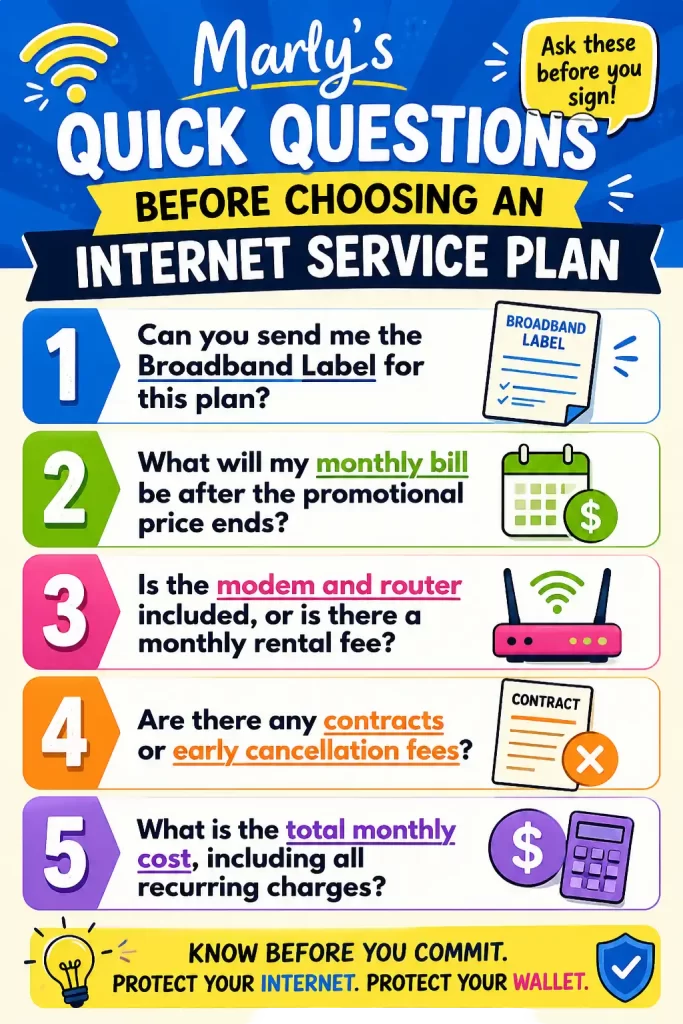
Marly’s Quick Questions Before Choosing an Internet Service Plan
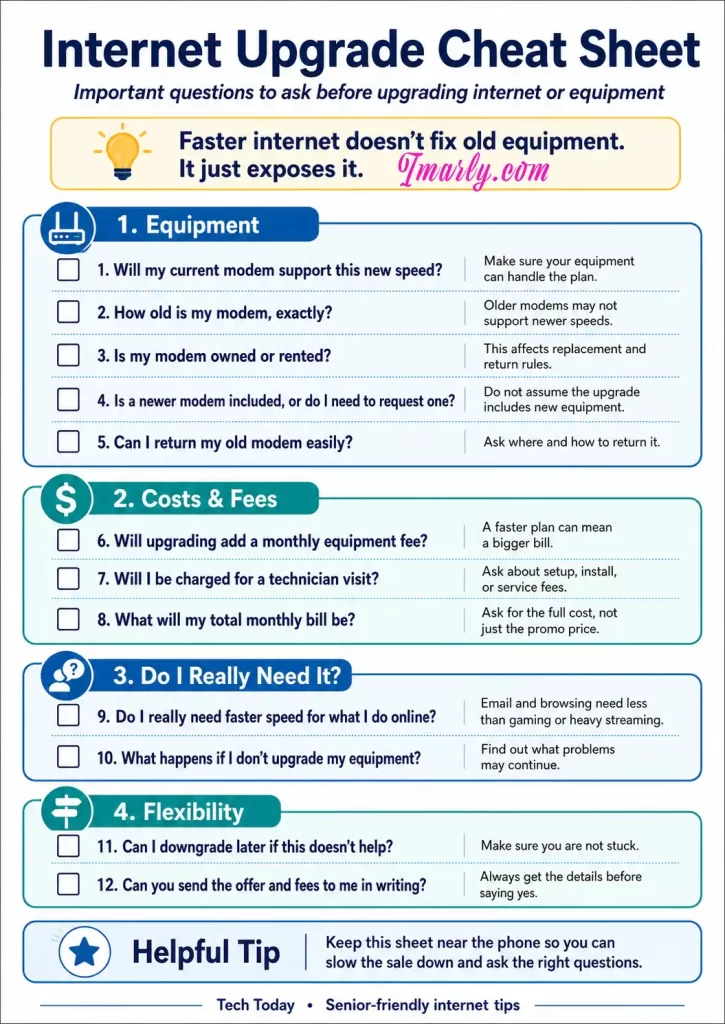
If you are considering updating your internet but are not firm on it yet, screenshot this quick guide, call your internet provider, and ask the questions in this image. The goal is to get an idea of what to look for as you consider and form the right questions for your situation.
Internet Services Plans: More Money Saving Questions to ASK?
Imarly resource tool box
Once you’ve narrowed down your choices, don’t stop there. Whether you’re signing up as a new customer or upgrading your current internet service, asking the right questions can make the difference between a great deal and an expensive mistake. Check out my guide, 👉10 Questions to Ask Before Upgrading Your Internet, to learn the questions I believe every customer should ask before saying “yes.”
🌐 FCC Broadband Consumer Labels
Learn what a Broadband Label is and how it helps you compare internet service plans. 👉Broadband Consumer Labels
Questions to ask before upgrading internet service should come before saying yes to a faster—and usually more expensive—plan.
Internet providers often make upgrading sound simple: pay a little more each month and everything online will suddenly become faster. But a higher-speed plan may not solve the problem if your modem, router, Wi-Fi setup, computer, or other equipment cannot handle the new speed.
Before agreeing to anything, slow the conversation down and ask questions.
You do not have to understand every technical term. You need enough information to know what you are buying, what equipment is required for upgrading internet service, and what the complete cost will be.
Faster Does Not Mean Better Internet
Better Internet Is Not Only Faster Internet.
A faster internet plan can help when several people are streaming, gaming, working from home, making video calls, or using many connected devices at the same time.
However, speed is only one part of your internet connection.
An old modem may not support the faster plan when upgrading internet service. A weak router may not send a good Wi-Fi signal throughout the house. A computer may be running slowly for reasons unrelated to the internet. Even the location of your router can affect your experience.
That is why you should identify the actual problem before buying more speed.
Here are ten questions to ask your internet provider before agreeing to an internet speed upgrade.
1. Will My Current Modem Support the New Internet Speed When Upgrading Internet Service?
Your modem is the device that connects your home to your internet provider. Every modem has limits on the speeds and technology it can support.
Ask the representative to confirm that your modem is approved for the exact plan being offered before upgrading internet service.
Do not settle for a vague answer such as, “It should work.”
Ask:
“Can you check the modem model listed on my account and confirm that it supports this specific speed?”
For example, you could upgrade from a 300 Mbps plan to a 1 Gig plan, but an older modem might not be capable of delivering the full new speed. You could end up paying for service your equipment cannot properly use.
2. How Old Is My Modem, Exactly?
Many people have used the same modem for years and have no idea how old it is.
That is understandable. Modems usually sit quietly on a shelf, behind a television, or near a computer. As long as the internet works, we rarely think about them.
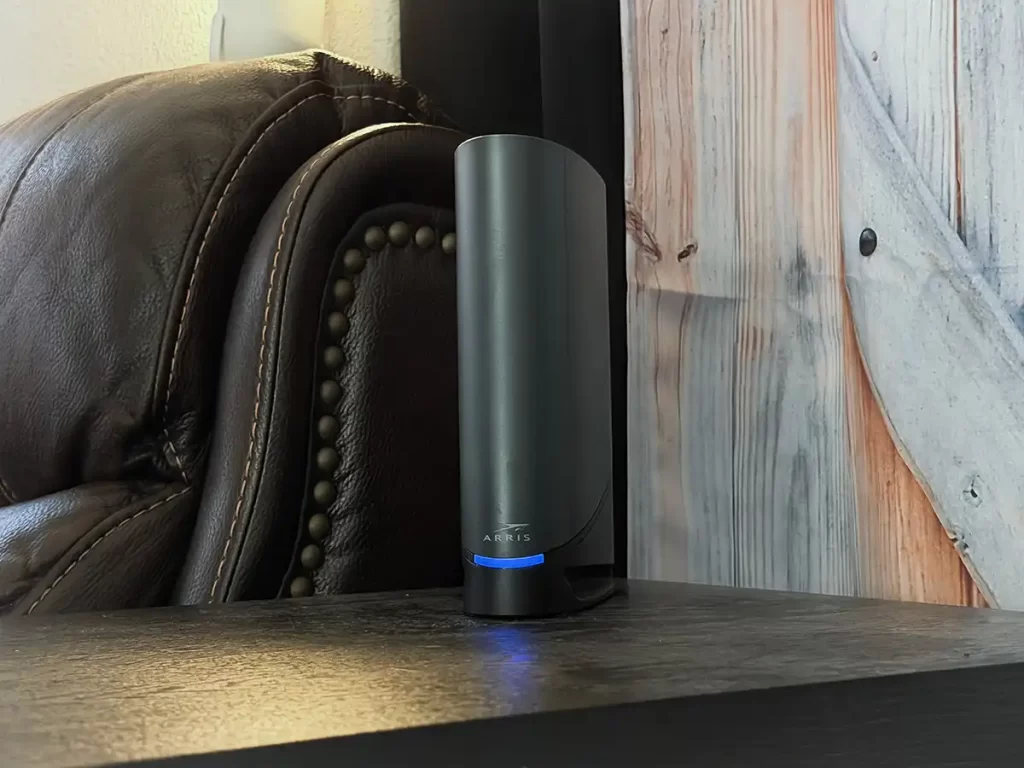
Ask the provider when the modem was first activated or issued. You can also look for the brand and model number printed on the device.
Age alone does not automatically make a modem unusable, but an older model may not support newer internet standards, faster speeds, or current security updates.
Write down the modem’s:
Manufacturer or brand
Model number
Approximate age
Maximum supported speed
Provider approval status
Having this information makes it easier to confirm whether the modem needs to be replaced.
3. Do I Own the Modem, or Am I Renting It?
Many customers are surprised to learn that they have been paying a monthly modem or gateway rental fee.
Look at your internet bill for terms such as:
Equipment rental
Modem rental
Wi-Fi equipment
Gateway
Advanced Wi-Fi
Panoramic Wi-Fi
Whole-home Wi-Fi
Ask the representative whether the equipment belongs to you or the internet provider.
When equipment is rented, the provider is generally responsible for replacing it according to its policies. When you own it, you may be responsible for purchasing a newer compatible model.
Knowing who owns the modem also helps you understand whether it must be returned if you replace it, move, or cancel service.
4. Will the Upgrade Add a Monthly Equipment Fee?
A different modem may be required, which can change the final monthly price as an additional monthly charge. Ask, “What will my total monthly bill be after the upgrade?
You will want them to include equipment fees, taxes, and any optional services when upgrading internet service?” Ask, “If the quoted price is a temporary promotional rate, what will the normal price be when the promotion ends.
Internet providers must display FCC Broadband Consumer Labels for standalone broadband plans at points of sale. These labels provide information about pricing, introductory rates, typical speeds, data allowances, and certain fees. Ask the representative to show or send you the broadband label for the plan before you agree to it.
5. Is a Newer Modem Included, or Do I Have to Request One?
Upgrading internet service rarely includes automatic upgrades to the equipment.
Ask the provider directly:
“If my current modem does not support this speed, will you automatically send me a replacement?”
Then confirm:
Is there a charge
Will the replacement be new or refurbished
If you must install it yourself, and is there a charge for a technician install
Whether you must call to activate it
How long you have to return the old equipment
Some providers may leave the old modem active unless the customer specifically requests newer equipment. That might cause frustration when the new plan fails to perform as expected.
6. How Do I Return My Old Modem?
Equipment returns can become expensive when they are not handled correctly.
Ask where the old modem must be returned and whether you can:
Take it to a local provider store.
Drop it off at a shipping location.
Prepaid return label
Schedule a pickup
Ask for a receipt or tracking number.
Keep that proof until the device disappears from your account and your next few bills show no unreturned-equipment charge.
It is also a good idea to photograph the modem’s serial number and the return receipt. Those photos can be extremely helpful if the provider later claims you never returned the equipment.
7. Will I Be Charged for a Technician Visit?
A representative might recommend sending a technician to install equipment, check wiring, or improve the connection.
Before scheduling the appointment, ask whether there will be a charge.
Ask:
What is the exact technician fee?
Is the fee waived as part of the upgrade?
Will I be charged if the problem is inside my home?
Will I be charged if the provider’s equipment is defective?
Can I install the modem myself instead?
Could additional wiring or outlet charges be added?
Please include any promised fee waiver in your order confirmation and in your account notes.
A verbal promise can be difficult to prove later.
8. Do I Really Need Faster Internet for What I Do Online?
This may be the most important question on the list.
Think about how you normally use the internet.
Do you mainly:
Read email?
Browse websites?
Use Facebook?
Watch occasional videos?
Make video calls?
Stream television?
Play online games?
Work from home?
Upload large photographs or videos?
Have several people online at once?
Someone who mainly checks email, reads the news, shops online, and uses Facebook may not need the fastest available internet plan.
A larger household with multiple televisions, gaming systems, security cameras, phones, tablets, and computers may benefit from more speed—especially when several devices are active simultaneously.
The FCC offers broadband guides that compare common activities and household usage. The figures are general guidelines rather than guarantees, but they can help consumers think about what they actually do online before selecting a plan.
Before upgrading, ask the provider:
“Based on my actual usage and number of devices, why are you recommending this particular speed?”
The representative should be able to explain the recommendation in ordinary language.
9. What Happens If I Upgrade the Plan but Keep My Current Equipment?
This question helps reveal whether you are being sold an incomplete upgrade.
Your internet connection may continue working with old equipment, but you may not get the full speed you are paying for. What you are experiencing is an incomplete upgrade. You could also experience dropped connections, buffering, weak Wi-Fi, or inconsistent performance.
Ask whether keeping the old modem will:
Limit maximum speed
If there is no speed limit, will it slow down after a certain speed? Some internet plans offer unlimited but slow down after reaching 300mbps or more.
Cause compatibility problems
Affect reliability
Prevent technical support
Create security concerns
Require replacement later
Request a clear explanation of what the equipment can and cannot support.
Remember that the modem brings the internet into your home, while the router distributes the connection to your devices. Some providers combine both functions into one device called a gateway.
The modem can support the plan while the router or Wi-Fi connection remains the real problem.
10. Can I Downgrade Later If the Upgrade Does Not Help?
Before accepting a faster plan, find out whether you can return to your current plan or choose a less expensive one.
Ask:
Is there a contract?
Is there an early termination fee?
How long does the promotional price last? This is important to know because most providers will not send you warnings before increasing your price to the normal rate. Set a calendar alert to notify you when you are near the end of your promotion.
"As someone who spent years in tech support, I'll admit this is something I didn't even know existed at the time. It wasn't part of my role, and if a customer had asked me for one, I probably would have needed to ask a supervisor. That's exactly why I'm sharing it now—because if it was easy to miss from the inside, it's even easier for customers to never know it's available."
base price, introductory pricing, recurring fees, certain one-time fees, typical download and upload speeds, latency, and information about data allowances. Review the label before completing the order.
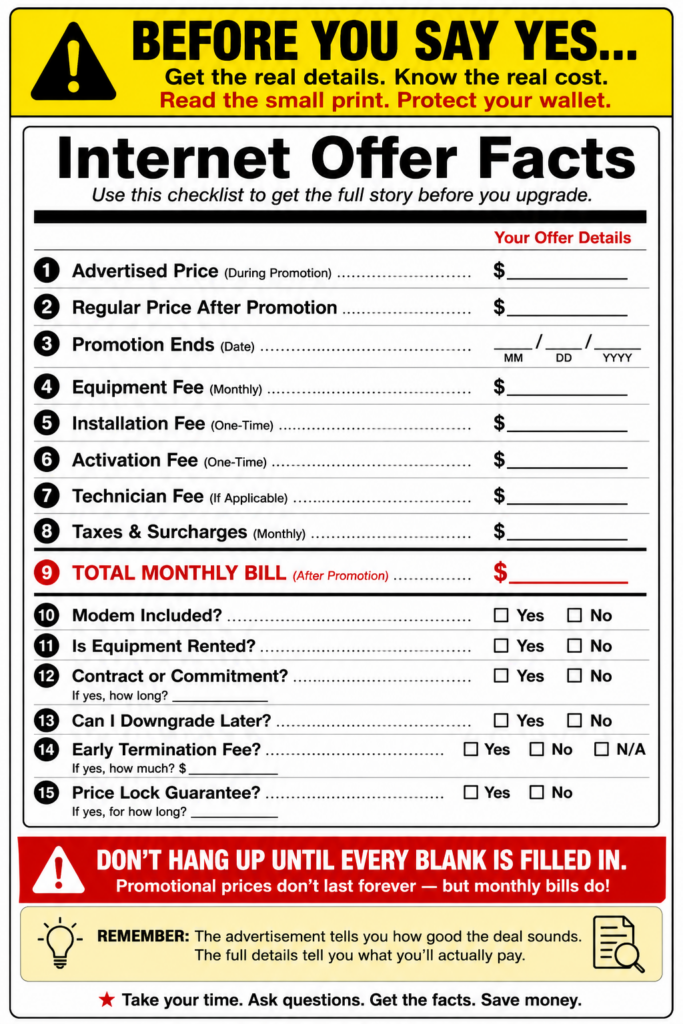
Download your printable version of this cheat sheet by clicking on above photo or here 👉Internet upgrade cheat sheet.
Ask for the Offer in Writing
Before agreeing to an internet upgrade over the telephone, ask the representative to email or message you the complete offer.
The confirmation should include:
The name of the plan
Download speeds
Upload Speeds
New monthly price
Promotional period
Price after the promotion
Equipment charges
Installation or activation fees
Technician charges
Contract terms
Cancellation terms
Equipment return instructions
Do not allow yourself to be rushed.
You can say:
“Thank you. I need to review the full price and equipment requirements before I agree to the change.”
A legitimate offer should still make sense after you have had time to read it.
Check Your Current Internet Before You Upgrade
Before calling your provider, write down what is actually going wrong.
For example:
Websites load slowly
Video keeps buffering
Wi-Fi does not reach a bedroom.
Connection drops at certain times (It could be the device)
One device is slow, but others work normally.
Video calls freeze
Uploads take too long.
The internet becomes slow when everyone is home.
These clues matter.
If Wi-Fi is poor in one room, router placement or signal coverage may be the issue. If every device loses service, the modem, wiring, or provider connection may need attention.
If only one computer is slow, the computer may be the problem.
Paying for more speed without identifying the cause can leave you with the same problem and a higher bill.
A Simple Script to Use With Your Provider
You can read this directly to the representative:
Before changing my plan, can you let me know the complete monthly cost? Please include equipment fees. And will my current modem support the new speed? Will I have to replace my equipment, and is there an installation or technician charge? What will the price be after the promotion ends? Please send me the FCC Broadband Consumer Label and the full offer in writing to help me decide.
There is nothing rude or difficult about asking these questions.
You are the customer, and you have the right to understand what you are purchasing.
Be Careful With Unsolicited Internet Upgrade Calls
Not every person claiming to represent your internet company is legitimate.
You will find that there are excellent scammers who sometimes impersonate internet and cable providers. These scammers offer discounts, upgrades, or lower bills. And for all the hard work these scammers put into scamming you, they will request an advance payment more often in the form of gift cards, banking details, passwords, or remote access to your computer.
The Federal Trade Commission has warned consumers—including older adults—about scammers pretending to represent television and internet companies.
When someone unexpectedly calls with an offer:
Do not provide account passwords or payment information.
Do not allow remote access to your computer.
Hang up.
Find the provider’s telephone number on your bill or official account.
Call the company directly and ask whether the offer is real.
Do not rely on the caller ID or a telephone number supplied by the caller.
Faster internet does not fix old equipment. It often just exposes its limitations.
Before paying for more speed, make sure your modem and router can support it. Find out what the upgrade will really cost, ask whether new equipment is included, and decide whether the faster plan matches how you actually use the internet.
Most importantly, remember that you do not have to decide the sales call.
Slow the sale down.
Ask the questions.
Get the answers in writing.
Then decide whether the upgrade is truly right for you.
Keep Learning and Stay Protected
Technology is constantly changing, but you don’t have to figure it out alone. Before making any changes to your internet service, take a few minutes to review the official resources below. They provide reliable information about broadband labels, internet speeds, consumer rights, and filing complaints if something doesn’t seem right.
Scam Watch & Protect(on iMarly.com) – Learn how to spot fake internet provider calls, phishing emails, and other common scams targeting consumers.
And because scammers often impersonate internet and cable companies with fake offers, don’t forget to visit my Scam Watch & Protect section, where I share real scams, warning signs, and practical tips to help you recognize and avoid them. The more informed you are, the harder it becomes for scammers—and confusing sales tactics—to catch you off guard.