

This post is part of my complete guide:
Best Free Video Editing Software – Full Series Overview
Finding the best free video editing software can be tricky; not all free options are truly free. I’ve reviewed 6 popular programs and created a comparison guide that brings everything together in one place.
⚠️ Important Download Warning
Have you ever worried that the software you download might not be safe? Video editing tools are among the most impersonated online. These impostors copy trusted logos, duplicate entire sites, and even purchase legitimate ads to lure you in.
Your protection checklist:
- Use official links.
- Never search for free downloads and click the first link; this is a common way to get tricked by malicious sites.
- Stay away from cracked or unlocked versions.
- If a website address appears to look slightly different, stop!
- If nothing else, your takeaway from this should be “Your Safety Matters” more than free software.
Why Free Is Not Always Really Free
There are three main “free” models:
- Truly Free (Open-Source or Strategic Free)
- Shotcut
- OpenShot
- DaVinci Resolve
- Freemium (Free with Limits)
- Clipchamp
- CapCut
- Filmora
- Free Trial (Temporary)
- Many professional tools
Free often means:
- Watermarks
- Export limits
- Feature restrictions
- Subscription nudges
It can be confusing.
And confusion is where scams thrive.
How to Choose the Right One
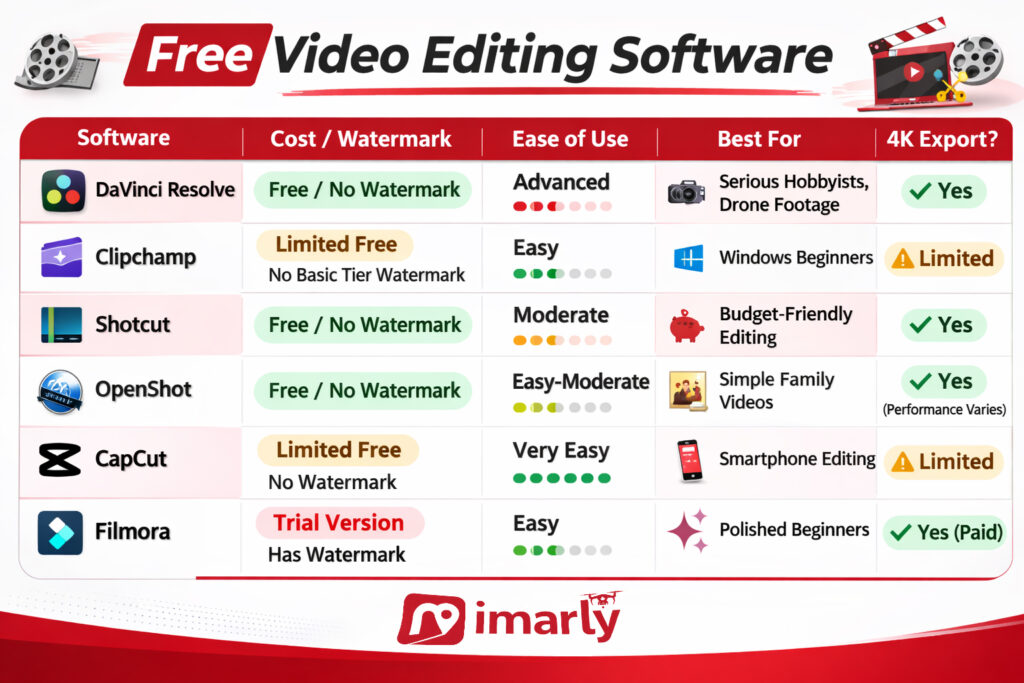
If you want:
Professional-level editing and no watermark
→ DaVinci Resolve
Simple Windows editing
→ Clipchamp
Completely free without corporate accounts
→ Shotcut or OpenShot
Phone editing and social media templates
→ CapCut
Polished and easy but willing to pay
→ Filmora
There is no “best” editor.
There is only the right one for your comfort level and computer.
Free video editing software related post:
- DaVinci Resolve Free Editor: Is It Too Powerful for Beginners?
- Clipchamp Video Editor for Windows: The Easiest Built-In Option?
- Shotcut Free Video Editor: A Truly Free Alternative Without Watermarks.
- OpenShot Video Editor: Free, Simple, and Easy to Start.
- CapCut Video Editor Review: Easy for Phone Editing but Is It Safe?